
Blog Post 2 - Web Scraping IMDB For TV Show Recommendations
This is a project for PIC16B at UCLA where we write a webscraper to collect a list of TV shows which share at least one actor with one of our favorite shows. In this blog post I will be using a recent favorite of mine, Demon Slayer. We then perform a light analysis of these movies/TV shows. My repo is here if you wish to follow along. One future improvement I plan to incorporate is a bash script which takes a string argument of either a link to content on imdb or a name and then runs the scraper and analysis to automate some of the hard-coded variables in this project.
The Webscraper
For this project we use the module scrapy which is very helpful and intuitive in many ways. The repo may look intimidating at first, but with scrapy installed we can run a single command to populate most of the project automatically. For this class I use a enviroment named PIC16B, and I assume that we begin this project by navigating in our terminal to an appropriate folder where we want our project.
conda activate PIC16B
scrapy startproject IMDB_scraper
cd IMDB_scraper
Scrapy provides you with the command scrapy genspider example example.com which gives you a very basic spider to fill out yourself. Our final webscraper looks similar, but includes two other functions to handle different tasks which I will discuss below.
import scrapy

class example(scrapy.Spider):
    name = 'example'
    allowed_domains = ['example.com']
    start_urls = ['http://example.com/']

    def parse(self, response):
        pass
Review of My Functions
In my spider, I import specific scrapy items indivually and I will put them here for clarity.
from urllib.parse import urljoin
from scrapy.spiders import Spider
from scrapy.http import Request
Parse
parse is a very simple function because its only task is to take our start URL https://www.imdb.com/title/tt9335498/ and navigate to the part of the website with the full cast and crew.
def parse(self, response):
    '''
    The beginning of the webscraper takes in a imdb TITLE url such as "https://www.imdb.com/title/tt9335498/".
    It navigates to the full credits page.
    '''
    yield Request(urljoin(response.url, 'fullcredits'),
                  callback = self.parse_full_credits)
This takes the url of the response object (which describes the interaction between our computer and the website) and joins it with the string fullcredits in order to make a url that looks like https://www.imdb.com/title/tt9335498/fullcredits. Importantly, the second argument callback = self.parse_full_credits informs the request what function to access.
Parse Full Credits
parse_full_credits is another simple function because all it needs to do it locate the list of actors, then pass the url for each actor to another function.
This line:
[a.attrib["href"] for a in response.css("td.primary_photo a")]
was provided, and it makes sense to iterate over these href links and yield Requests which move us on to our next function, parse_actor_page.
def parse_full_credits(self, response):
    '''
    This function takes in a imdb FULL CREDITS url such as "https://www.imdb.com/title/tt9335498/fullcredits".
    It navigates to the each actor's individual page.
    '''
    # collect list of actor links
    links = [a.attrib["href"] for a in response.css("td.primary_photo a")]

    # iterate over links and yielding requests to our next function
    for link in links:
        yield Request(urljoin(response.url, link),
                      callback = self.parse_actor_page)
Parse Actor Page
This last one is the most complicated but can be broken down into its simple components as well. First, we use css selectors to get the actor name. Next, we collect the list of movies listed on their page. Finally, we yield these pairs as a dict.
def parse_actor_page(self, response):
    '''
    This function takes in a imdb ACTOR indivudal url.
    It yields a dictionary containing the actor's name and the title for each title listed on their page.
    '''
    # get actor name
    name = response.css('div.name-overview span::text').get()

    # get list of movies
    movie_list = [item.css('a::text').get() for item in response.css('div.filmo-row')]

    # yield dict with actor & movie
    for movie in movie_list:
        yield {
            "actor": name,
            "movie_or_TV_name": movie
        }
What at first seemed like an intimidating project really turns out to be manageable when broken down into small pieces.
Analysis
The analysis portion of this blog is very simple, and is contained within a single Jupyter Notebook. We import standard modules and perform standard reading of files to obtain workable data.
import pandas as pd
import matplotlib.pyplot as plt
import numpy as np
results = pd.read_csv(r'\IMDB_scraper\movies.csv')
Now, we wish to count the movies or TV shows which occur the most so we use pandas.Dataframe.groupyby and apply Python’s len function to the result.
We also rename our column, and sort to see the most interesting results at the top.
counts = results.groupby("movie_or_TV_name").apply(len).reset_index()
counts = counts.rename(columns={0:"count"}).sort_values(by="count", ascending=False)
counts
| movie_or_TV_name | count | |
|---|---|---|
| 1659 | Demon Slayer: Kimetsu no Yaiba | 676 |
| 2451 | Fire Emblem Heroes | 340 |
| 7106 | Sword Art Online | 260 |
| 5652 | Pokémon Masters | 252 |
| 3577 | JoJo's Bizarre Adventure | 236 |
This seems reasonable, the show itself is at the very top and then below it we have other similar animes.
However, this makes it not a good recommendation because I have already seen it! So we will filter out. Additionally, we filter our any shows with less than 50 similar actors for plotting purposes.
counts = counts[counts.apply(lambda x: 'Demon Slayer' not in x["movie_or_TV_name"] and x["count"] > 150, axis=1)]
This long line first filters by 'Demon Slayer' not in x["movie_or_TV_name"] then filters by x["count"] > 150 where x would be a single row of our Dataframe.
plt.bar(counts["movie_or_TV_name"], height=counts["count"])
plt.xticks(rotation=90)
plt.show()
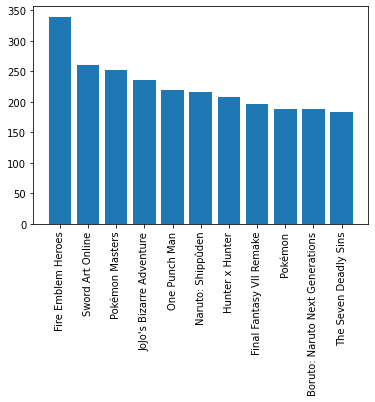
This is our desired result, becuase now we have a nice graphic which choices for our next binge-worthy TV show!